
I remember landing in a new city with nothing but a hostel address and a vague idea of what I wanted to see. By the second day I had already missed a museum booking and eaten at two overpriced tourist spots because I had not written anything down. That is when I started using my own travel itinerary template, and I have not traveled the same way since.
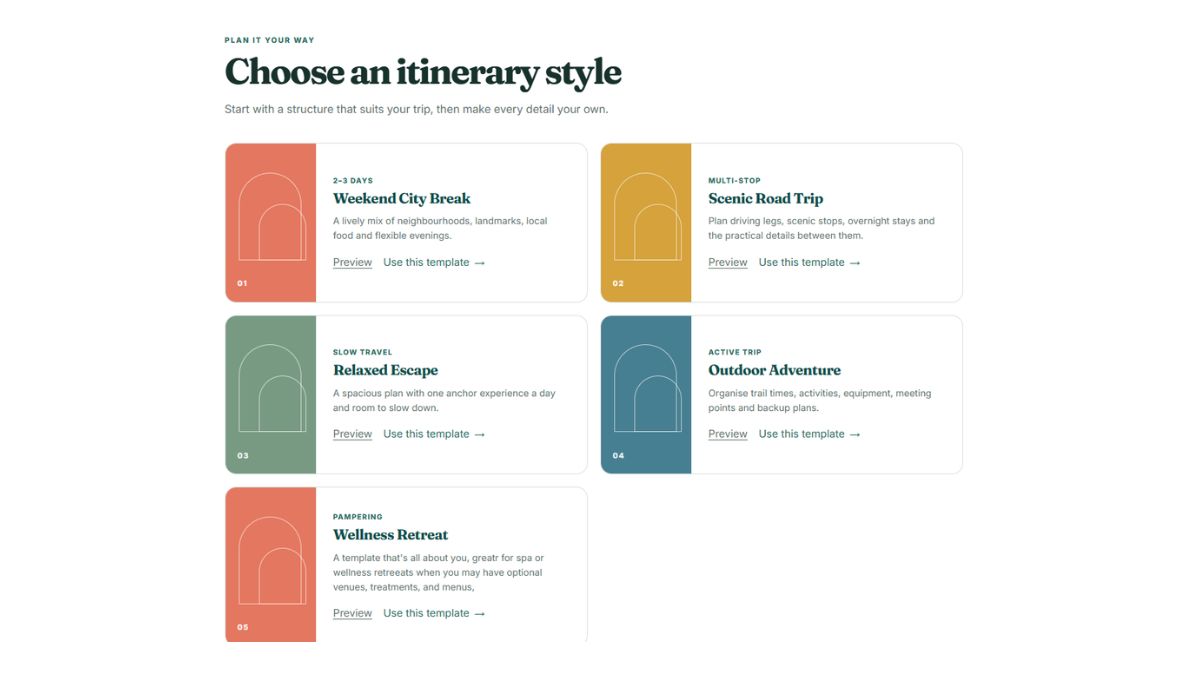
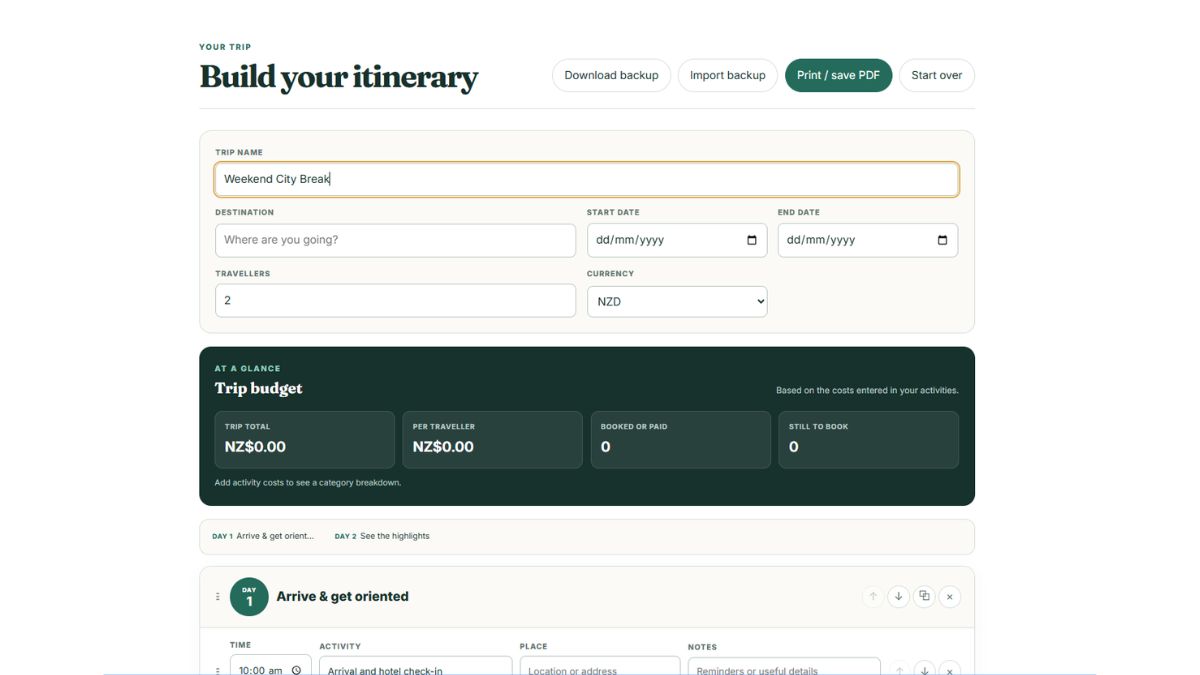
A good travel itinerary template does more than list what to do. It holds your bookings, your budget, your daily timing, and your backup plans in one place so your brain can focus on the actual trip. Below I break down the sections that matter, the formats worth trying, and the mistakes that trip people up. You will also find the Destinations Uncovered digital itinerary template to pair with this guide, with an overview, daily plans for activities and timings, and a cost calculator. Currently there are 6 templates to choose from. Just match the template for different types of travel.
Intinerary Builder
Access our digital travel itinerary template
Choose the template that suits your travel, track expenses, log activities, save, export and print
Go to the template builder
Why You Need a Travel Itinerary Template
The biggest travel mistake I see is not a lack of planning. It is scattered planning. Booking confirmations sit in your email, restaurant ideas live in a saved folder, and the budget is a rough number in your head. A travel itinerary template pulls all of that into one place.
Executive assistants and travel professionals do this for a living. On travel forums, assistants who manage complex schedules for executives regularly share the templates they rely on, because they know that a clear itinerary saves hours on the road. The same logic applies to a solo trip or a family vacation. When your daily plan is written down with times and addresses, you stop wasting energy on decisions and start enjoying the place you traveled to see.
Templates also help when you travel with other people. A shared itinerary keeps everyone on the same page about meeting points, meal plans, and daily costs. Instead of repeating yourself all day, you can point to the plan and keep moving.
The core sections of a good travel itinerary template
Every useful template I have tried shares three building blocks. You can use our online itinerary template, or build your own. Either way, these three sections will carry the weight.
Trip Overview
The overview is the spine of your template. It should include your dates, destinations, flight and train numbers, accommodation names and addresses, and every booking reference you might need. Think of it as the page you open first when you need a quick answer.
This section matters most on travel days. When a flight is delayed or a transfer is missed, you do not want to dig through email threads. One clean overview page with the essentials can save you from a very stressful hour at an airport.
Daily plans with activities and timings
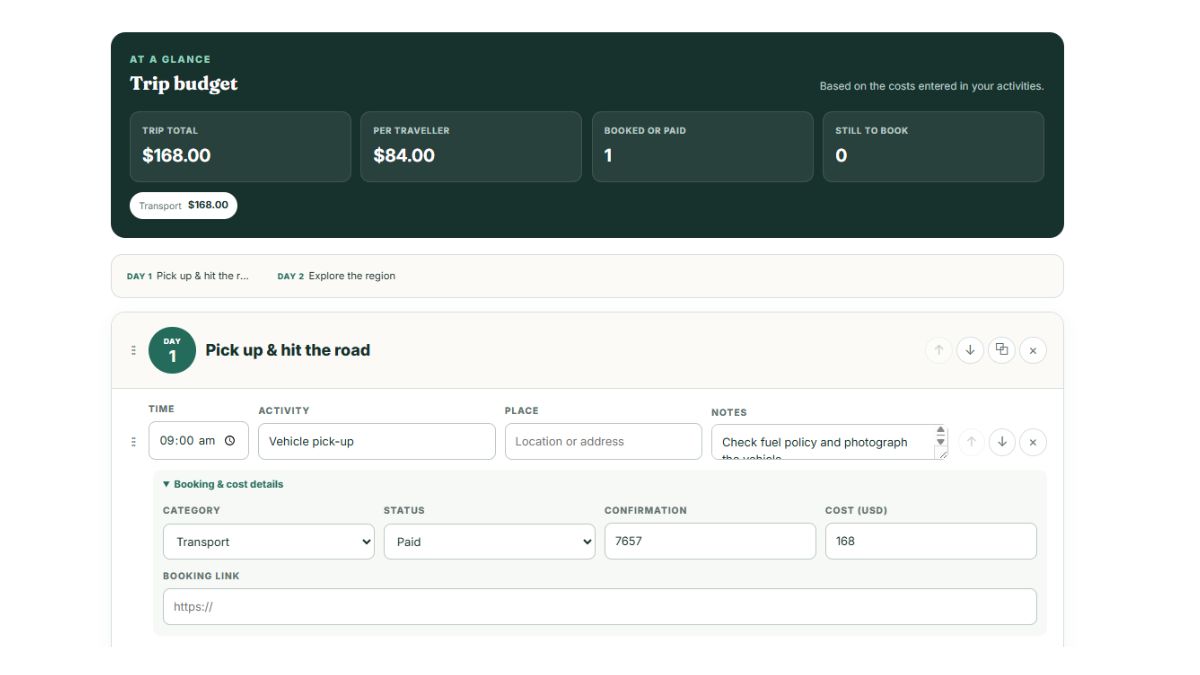
The daily plan is where the itinerary comes to life. Divide each day into morning, afternoon, and evening blocks, then assign activities with specific times. For anything that requires a booking, include the reservation details and a reminder of how far in advance you need to arrive.
I like to keep each day realistic. One major activity in the morning, a relaxed lunch, one activity in the afternoon, and an evening that is either planned or intentionally open. Leave space for the unexpected, because the best travel moments are often the ones you did not schedule.
Cost calculator
A travel itinerary without a budget is just a wish list. A cost calculator section lets you track what each part of the trip will cost before you go and what you actually spend while you are there.
Break your budget into categories like transport, accommodation, food, activities, and emergencies. Add your estimated costs up front, then update the actual amounts as you go. Our free travel itinerary template tool combines the overview, activities and budget calculator in one file so you do not have to juggle separate documents.

How to build your own travel itinerary template
You do not need design skills to create a template that works. Follow these five steps and adjust them to your own travel style.
Step 1: Choose your format. A word-based template in Google Docs gives you room for notes and descriptions. A spreadsheet in Excel or Google Sheets handles budgets and booking details well. Notion offers a flexible workspace, with popular travel planner templates that combine itinerary, budget, and packing list in one view. Canva and Adobe Express both provide free itinerary template ideas with a more visual, print-friendly look. Or you can use our templates that are already done for you.
Step 2: Build the overview first. Add your trip name, dates, and destinations at the top. Below that, list each booking with its reference number, the provider, and the date and time it applies. This becomes your master reference page.
Step 3: Plan day by day. Create one section per activity slot. Use morning, afternoon, and evening headings, and under each one list the activities, addresses, and the time you need to leave. Add a notes area for restaurant recommendations and backup ideas.
Step 4: Add the cost calculator. Create a simple table with estimated and actual costs per category. Keep a running total so you can see at a glance whether you are over or under budget.
Step 5: Test it on a short trip. The first time you use a template, you will notice what is missing. That is normal. Adjust it after each trip and it will keep getting better.
If you would rather use a ready-made tool, use the Destinations Uncovered interactive template builder. It includes the overview, daily plans, and cost calculator all in one place.
Free travel itinerary template options
If starting from a blank page feels daunting, you have plenty of free options. Here is a quick look at what is available:
| Format | Best For | What to Know |
|---|---|---|
| Google Docs via gdoc.io | Itineraries with room for notes | Free editable online templates for personal, commercial, and educational use |
| Excel or Google Sheets | Budgets and booking tracking | Free downloadable templates that combine itinerary, budget, and packing list |
| Notion | All-in-one trip planning | Travel planner category with templates like Trip Planner: Itinerary, Budget and Packing List |
| Canva | Visual, print-friendly layouts | Free customizable itinerary planner templates |
| Adobe Express | Quick, polished designs | Dozens of online itinerary template ideas, free to customize |
| Destinations Uncovered | All in one trip planning and cost calculator | A range of free, customizable online templates, itinerary, planners and budget included, save, download, and print. |
The right choice depends on how you like to plan. If you want to see your whole trip on one visual page, Canva or Adobe Express makes that easy. If you prefer spreadsheets and numbers, a Google Sheets or Excel template will feel more natural. Notion is a strong middle ground for travelers who want notes, budgets, and packing lists connected in one workspace. The Destinations Uncovered template is detailed and can be accessed anywhere digitally or can be printed as full daily pages with costs.
How to use your itinerary template on the road
A template that only lives on your laptop will not help you when you are standing in a train station staring at a departure board. Save a copy to your phone before you leave, and make sure it works offline. I also keep a printed version in my bag, because phones die and service disappears at the worst moments.
Update the template at the end of each day. Adjust the budget totals, cross off the places you visited, and move anything you skipped to a later day. Ten minutes each evening keeps the plan accurate and gives you a record of the trip you can look back on.
Common template mistakes to avoid
Even a good template will fail if you use it poorly. Here are the mistakes I see most often:
- Overpacking the schedule. A day with eight activities is not a vacation, it is a race. Leave gaps for meals, rest, and getting lost.
- Forgetting addresses and references. An activity name means nothing when you are standing on a street corner with no service. Always add the address and booking number.
- Skipping the budget until the end. If you do not track costs as you plan, the spending will surprise you later.
- Ignoring transit time. Getting between places always takes longer than you expect. Add travel time between activities to your daily plan.
- Making the template too complicated. If your template takes an hour to update each day, you will abandon it. Keep it simple.

Frequently Asked Questions
Here are the questions I hear most often about building and using travel itinerary templates.
How do I create my own travel itinerary?
Start with an overview of your dates, transport, and accommodation, then build one section per day with activities and timings. Finish with a cost calculator so your budget stays visible. If you prefer not to start from scratch, use a free editable template from Destinations Uncovered, Google Docs, Excel, Notion, Canva, or Adobe Express and adapt it to your trip.
What is the best format for a travel itinerary?
The best format is the one you will actually update. Spreadsheets like Excel and Google Sheets work well for budgets and booking details. Google Docs gives you more space for notes and daily descriptions. Notion combines both in one flexible workspace, while Canva and Adobe Express are great if you want a visual, print-friendly layout. Destinations Uncovered, like Nation, incudes it all, flexibility and space, electronic versions and visual print friendly layouts.
How do I write a travel itinerary?
Write it in clear sections. Start with the trip overview and booking details, then create daily blocks with morning, afternoon, and evening slots. Add specific times for activities with reservations, along with addresses and transit notes. Keep a running cost section, and leave a small space each day for spontaneous finds.
Is there a free template for creating a travel itinerary?
Yes. Free editable itinerary templates are available through Destinations Uncovered, Adobe Express, Canva, and Google Docs template collections, and there are free downloadable Excel travel itinerary templates that also cover your budget and packing list. Notion has a travel planner category with many templates, and travelers on forums like the Rick Steves community occasionally share their own free Google Sheet templates.